Symbols - ☗ Copy ☂ Paste ♣ Symbols 🌍 Online 🏘 Free
Here, you can copy and paste 1100+ symbols and emojis anywhere you want. You'll find all kinds of symbols, including weather symbols, zodiac signs, chess pieces, text icons, trees, plants, food, flowers, animals, hand signs, people, hearts, currency symbols, music emojis, objects, time emojis, transport emojis, body emojis, utility symbols, moon emojis, and much more. You'll find everything here, and you can copy and paste them anywhere you want.
Related Links Of ♣ Symbols
𓂀 All Symbols 🜛 Alchemical Symbols 𓂀 Ancient Egypt Symbols ﷺ Arabic Symbols ᬎ Balinese Symbols 𖤍 Bamum Symbols ᯼ Batak Symbols 𑁍 Brahmi Symbols 𒍜 Cuneiform Symbols ₹ Currency Symbols 𐠧 Cypriot Symbols ✅ Dingbats Symbols 🂒 Domino Tiles Game Symbols ◈ Geometric Symbols Ⴃ Georgian Symbols Ⱙ Glagolitic Symbols β Greek Symbols 𐙈 Linear A Symbols 𐂡 Linear B Symbols 🀄 Mahjong Symbols 𑲏𑲶 Marchen Symbols 𞠐 Mende Kikakui Symbols 𐦐 Meroitic Symbols ၏ Myanmar Symbols 🃏 Playing Card Symbols ⁕ Punctuation Symbols ᛤ Runic Symbols 𑖍𑖼 Siddham Symbols ⵥ Tifinagh Symbols ꔆ Vai Symbols 𑣿 Warang Citi Symbols ꋅ Yi Symbols ☀ Symbols ☺ Emoji Symbols 👑 Object Symbols 🐯 Animal & Nature Symbols 🥭 Food Symbols 🚜 Transport Symbols ⅛ Math Symbols 🏂 Sports Emojis 💩 Smile Emojis 🧚♂️ People Emojis 🙇🏻 Pale Emojis 🤴🏼 Cream Emojis 👸🏽 Brown Emojis 👏🏾 Dark Brown Emojis 💃🏿 Deep Dark Emojis ٩(◕‿◕。)۶ Kaomoji ⌬ Technical Symbols ॐ Language Symbols 🇮🇳 Flag Symbols ॠ Hindi Symbols ▶ Arrow Symbols ⠞ Braille Symbols ♡ Heart Text Faces ╳ Line Symbols あ Japanese Symbols ㄾ Korean Symbols ঔ Bangla Symbols ௵ Tamil Symbols ౙ Telugu Symbols ༺ Tibetan Symbols ㊎ Chiness Symbols
Sign Symbols ☘ Copy ♣ Paste and 🍀 Share 📡 Signs Symbols 🚀 Online
Symbols is a collection of Text and Emojis Symbols. As you know symbol is a ☘ mark, ☬ sign, or word that indicates, signifies, or is understood as representing an 🚲 idea, 🛩 object, or 🤍 relationship. Here, you will find all types of symbols. Also here, you can copy-paste and share ⛢ symbols online.
Why should I use these emojis and symbols?
We have a huge collection of emojis and symbols that you might not find anywhere else.
Apart from that, we've added some features that can really make your day-to-day work easier. For example, if you click on any emoji or symbol, it opens in a pop-up where you can see its name, Unicode value, and HTML entity. This makes it easy to learn more about the symbol and use it correctly on your website. So, that's what you can do here.
Where can I use these ☃ Symbols?
You can use these symbols and emojis almost anywhere on the internet. They work on social media platforms like Facebook, Instagram, X, YouTube, LinkedIn, and many others. You can also use them in messaging apps like WhatsApp, WeChat, and almost any other chat application. Basically, you can use them on almost any website, app, or device that supports Unicode.
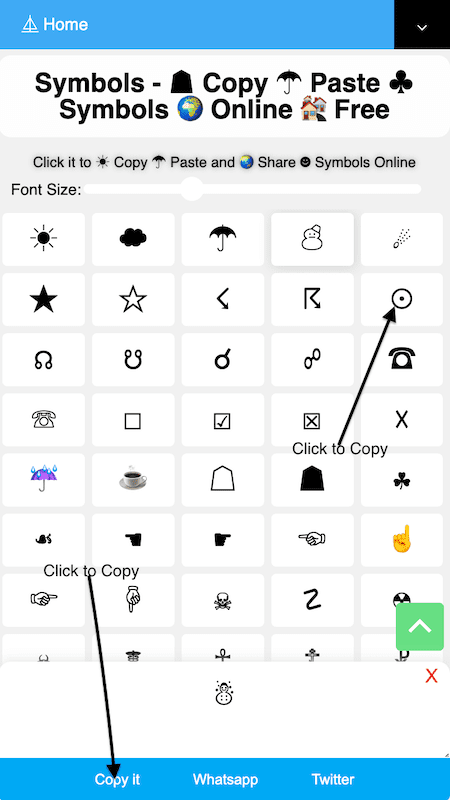
How to Copy ♠ Symbols?
It is easy to copy ♠ symbols. You have to just click on the ⚠ sign that you want to copy. As you click it will ⚠ copy and also appears on the ⚠ Textarea section bar. Also, you can use the "Copy it" button to ⚛ copy signs from the Textarea section bar. Just like up there an image you see at.
Will these symbols work on all devices?
Yes. All the symbols and emojis you see here work on almost every device, whether you're using an Android device, an iPhone, a laptop, or a tablet.
It doesn't matter which operating system you're using—Android, iOS, macOS, Windows, or Linux. They all support these symbols and emojis.
The appearance may vary slightly depending on the platform. For example, an emoji might look a little different on Apple devices than it does on Windows or Android. The design may change, but it still conveys the same meaning and feeling. The same applies to all emojis. Some may look slightly different across platforms, but their meaning stays the same.
Can I use these symbols and emojis in my videos?
Yes. If you want to add symbols or emojis to your videos, whether as part of the text or on their own, they'll work just fine.
We've tested them with Final Cut Pro, and they work well. We also expect them to work with Adobe Premiere Pro and most other video editing software because they all support Unicode symbols and emojis.
Since we have such a large collection, you can easily find almost any symbol or emoji you need. We also have a powerful search feature. We've designed it so you can quickly find emojis and symbols from across the entire website, not just the page you're currently viewing.
So if you're looking for a specific emoji, symbol, or icon, just use the search, and you'll find it quickly. That can help speed up your video editing workflow.
Can I use these symbols to create nicknames or usernames?
Yes, absolutely. Nowadays, many people don't just use plain text for their names or usernames. They often add symbols or emojis to make them more unique and visually appealing.
If you want to do the same, you can easily do it here. We have a huge collection of symbols and emojis that you can use to create stylish nicknames and usernames.
Here are some of example of usernames and nicknames:
✨ Shadow ✨
🌙 Luna 🌙
👑 King 👑
🖤 Ghost 🖤
🔥 Blaze 🔥
💖 Angel 💖
⚡ Storm ⚡
🌸 Sakura 🌸
🐺 Wolf 🐺
🔮 Mystic 🔮
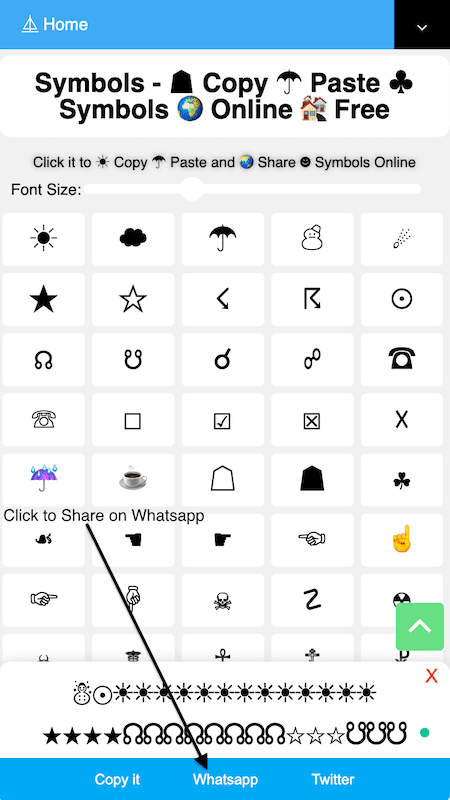
How to share ♨ Symbols on Whatsapp?
It is easy to ♨ share signs on Whatsapp. You have to just click on the 🌐 signs that you want to share on Whatsapp. As you click it will appear on the 🌐 Textarea section bar then click on the "Whatsapp" button. This will share your 💭 signs 🌐 on Whatsapp. Just like up there an image you see at.
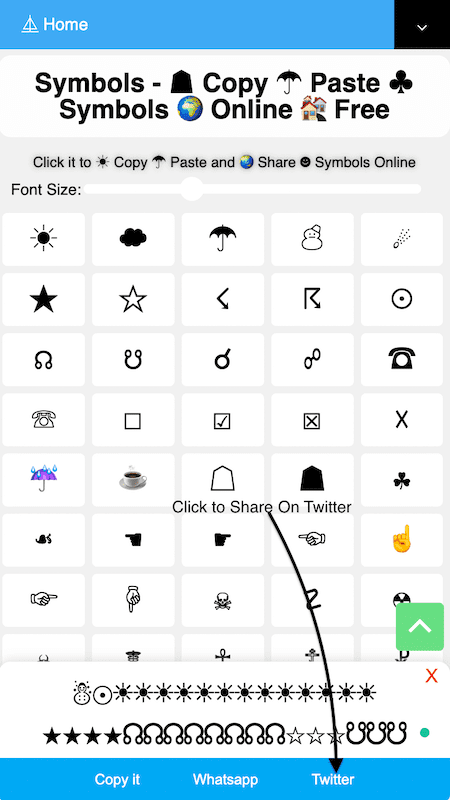
How to share 👻 Symbols on Twitter?
It has the same process as 👻 Whatsapp sharing. You have to just click on the 🔆 signs that you want to share on Twitter. As you click it will appear on the 🔆 Textarea section bar then click on the "Twitter" button. This will share all your 🕉 signs on Twitter. Just like up there an image you see at.

How to Increase and Decrease 🩺 Sign Sizes?
It is easy to increase and decrease 🩺 sign sizes. You have to just click on the Font Size input range bar then slide on the right side to increase sign sizes and slide on the left side to decrease sign sizes. Just like up there an image you see at.
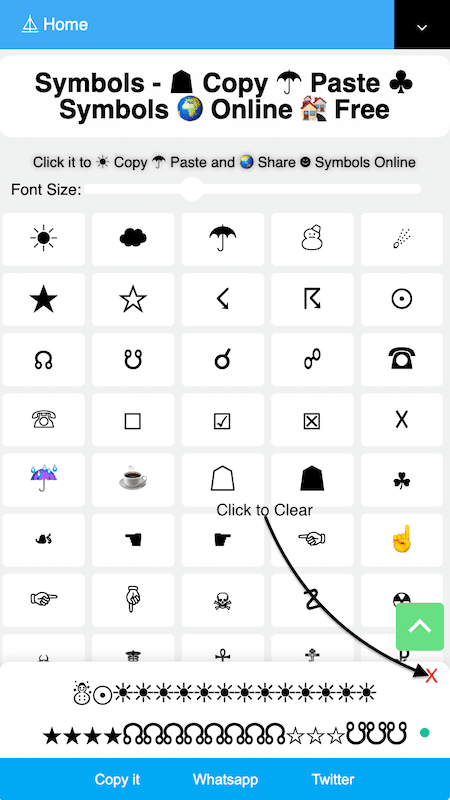
How to Clear the Textarea section bar?
It is easy to clear the Textarea section bar. You have to just click on the "X" button that is located on the Textarea section bar on the right top side. As you click on the X button it will clear the Textarea section bar.